
Bodyguard Escort
Turn Your Photos into Cinematic Bodyguard Escort Video
Bring your pictures to life with Guma. Easily transform your photos into dynamic escort videos featuring synchronized bodyguards, smooth camera tracking, and realistic night street lighting in seconds.
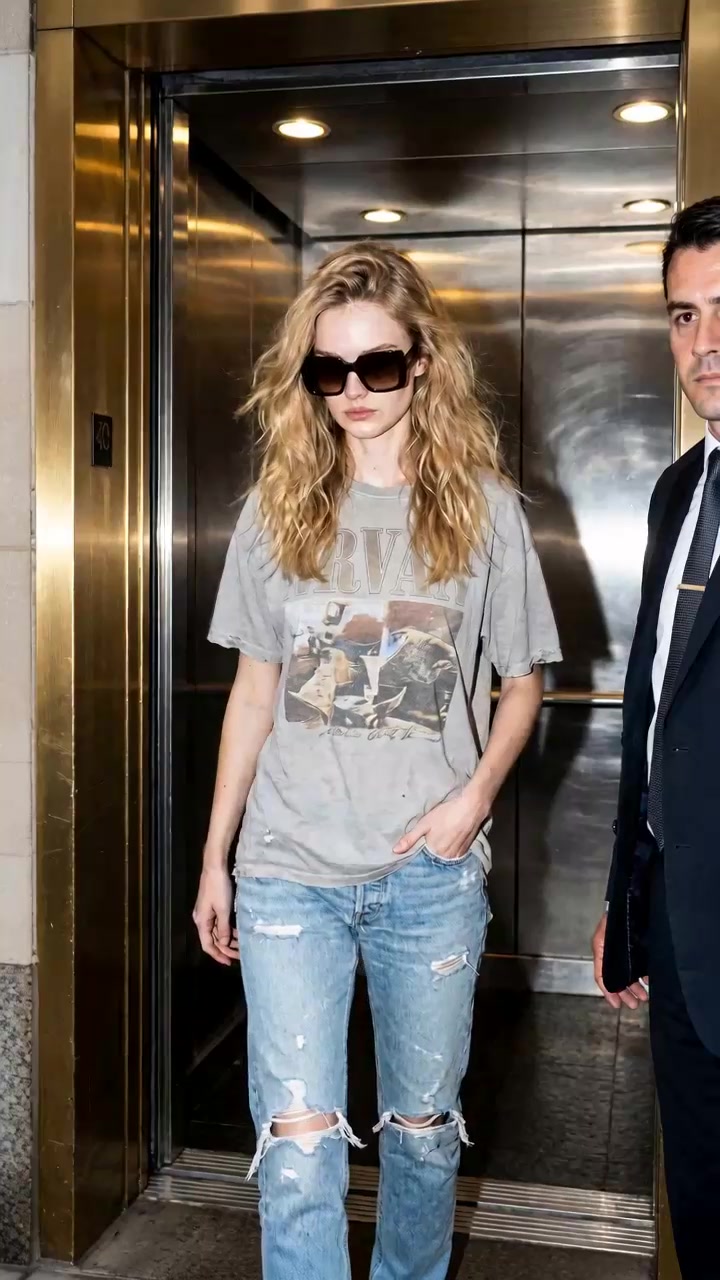
AI Prompt
Generate an 8-second hyperrealistic video with 4K HD cinematic-quality realism. {Camera shooting pixel parameters: 1.6}, natural image noise level: 3.0, {Realism parameter: 1.6}. The lighting and shadow transitions are seamless, and the human body proportions are perfectly accurate. The protagonist’s facial features, gender, temperament, hair color, hairstyle, and makeup are 100% based on the reference @image; the clothing remains unchanged. [First Frame] Keep the first frame unchanged. An 8-second video with continuous camera shots, always following the protagonist closely. Shot 1 (0.0–1.5s) Action description: The protagonist maintains a pose with one hand in his pocket, steadily walking out of the elevator toward the camera. The elevator doors fully open behind him. Camera movement: Fixed frontal shot; as the protagonist approaches, the camera slowly zooms in from a wide shot to a medium shot. Facial expression: The protagonist wears sunglasses and maintains a consistently aloof demeanor, showing no obvious emotional fluctuations. Shot 2 (1.5–4.0s) Action description: The protagonist continues walking forward, accompanied by several bodyguards dressed in black suits who walk alongside and behind him, moving synchronously. Camera movement: The camera continues to zoom in gradually, transitioning from the elevator interior to the lobby of a building. Eventually, the shot stabilizes on a close-up of the protagonist’s upper body. Shot 3 (4.0–5.5s) Action description: The protagonist walks from the building entrance onto an outdoor night street, turning slightly to head toward a black sedan parked by the curb. The ground is wet and glistens with moisture—indicating it has just rained recently. Camera movement: As the protagonist moves, the camera switches to a side-following shot. The background changes to a nighttime street scene, where you can see the warm glow of streetlights reflecting off parked cars and the neatly arranged bodyguards in formal attire. Shot 4 (5.5–7.5s) Action description: The protagonist walks up to the open rear door of the car, raises his hand to hold the edge of the door, then bends down and sits into the car. Camera movement: The camera remains fixed at the side of the car, slightly adjusting its angle to follow the protagonist’s movements. Shot 5 (7.5–8.0s) Action description: The protagonist fully sits inside the car, and the car door closes behind him. Camera movement: The camera shifts from the side view to a direct shot facing the closed car door, finally settling on the closed door as the final frame.
Explore the Creative Universe on Guma.top
Unleash your imagination with a flexible suite of generative AI video tools. Transform photos into dynamic videos, control character movements, refine existing footage, and create polished visual stories through an accessible workflow.
How to Create Your AI Escort Video
Upload Your Character Photo
Add a clear photo of your protagonist to lock in facial features, hairstyle, and outfit across every frame.
Generate the Escort Sequence
Start the generation process and let the AI coordinate the walking speed, camera movement, and synchronized bodyguard entourage automatically.
Render and Download in 4K
Watch the AI bring lighting reflections and physical motion together, then grab your high-definition MP4 video instantly.
Why Storytellers Choose Guma.top
Guma makes high-end visual production accessible to every creator. By pairing intuitive camera control with rock-solid character retention, you can produce viral scenes and commercial clips without touching complex timeline editors.
Seamless Character Consistency
Keep your main subject looking identical across changing camera angles, from indoor elevators to outdoor street curbs.
Realistic Lighting and Physics
Enjoy natural environmental shadows and realistic streetlamp reflections glistening on wet street surfaces.
Effortless Creation Process
Skip the steep editing learning curve and turn simple prompts into professional video clips in just a few clicks.
Dependable Cinematic Quality
Get crisp 4K visual results with smooth movement, consistent characters, and clean details without weird glitches or distorted features.
Explore More Popular Video Generators


Frequently Asked Questions About AI Bodyguard Escort Video Generation
How does Guma keep the protagonist looking the same throughout the video?
Guma uses smart reference technology that locks onto your uploaded character photo, preserving facial features, hairstyle, and wardrobe across all camera movements.
How are camera movements handled in the generated video?
The effect automatically coordinates cinematic camera movements with the protagonist and bodyguard entourage, creating smooth tracking shots, natural framing, and dynamic scene transitions.
What type of photo works best for an AI bodyguard escort video?
Use a clear, well-lit photo with the protagonist’s face, hairstyle, and outfit fully visible. A sharp image with minimal blur or obstruction helps produce a more consistent and realistic cinematic result.