
E-Commerce Video Maker
Turn Static Product Photos into Professional Video Ads
Transforming simple product photography into smooth, ad-ready video clips no longer requires a production studio or complex editing software. Guma’s image to video AI takes your static listing photos and adds realistic motion, subtle lighting shifts, and natural camera depth while preserving your core product details. It offers Shopify merchants and marketing teams a straightforward, reliable way to test new creative variations and get more mileage from their existing visual assets.
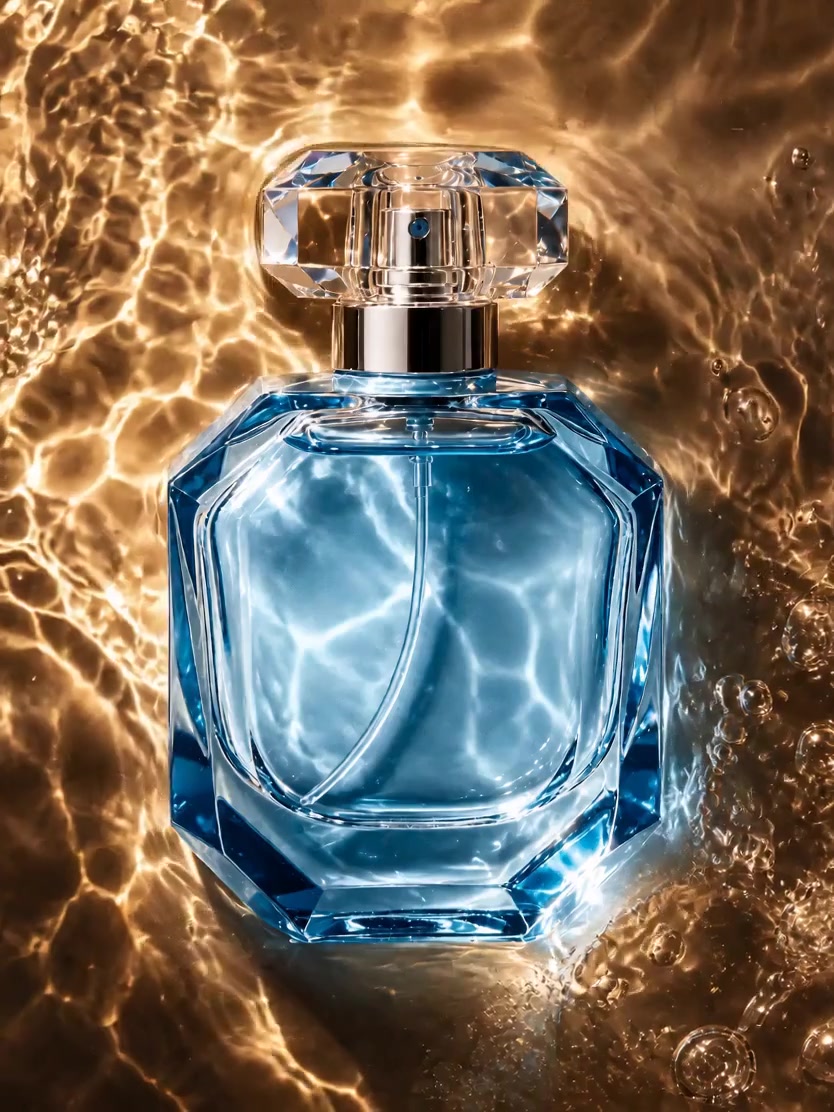
AI Prompt
Generate an 8-second hyperrealistic video with 4K HD cinematic-quality texture. {Camera shooting pixel parameters: 1.6}, natural image noise level: 3.0, {Realism parameter: 1.6}. The light and shadow transitions are seamless, and the human body proportions are perfectly accurate. The product’s main body is 100% based on the details, logo, shape, and color of the reference @image. [First Frame] The first frame remains unchanged. [Video: 8 Seconds] 0–2.5 seconds: Waterflow Erosion Stage—The product remains completely stationary throughout this phase. Warm golden, transparent water gently flows upward from both sides and the bottom of the bottle, creating a swirling curtain of water that gently brushes against the product’s surface. As the water overflows the top of the product, it forms a thin film that slides down smoothly. The shot is a fixed, close-up vertical perspective, with the focus always locked on the bottle itself. The background water ripples subtly shift along with the flow of water, enhancing the product’s moist texture and imbuing the static object with dynamic vitality. Lens Transition: 2.5–4 seconds—Macro Shot of the Bottle—The water continues to flow steadily, and the camera zooms in for a close-up macro view, slowly sweeping across the edges and the central front area of the product. This shot highlights the edges of the product and the state of the flowing water. With a shallow depth of field, the background is blurred, allowing the viewer to move from a broad overview to an intimate exploration of microscopic details, further emphasizing the product’s moist and translucent qualities. Lens Transition: 4–6 seconds—Product Moisture Display Stage—The camera maintains its macro perspective and slowly moves upward, focusing on the top of the product. The water flows over the bottle cap, forming a flowing water film that reflects golden ripples and droplets gathering at the corners before gently falling off. The focus remains locked on the top of the product, while the background is completely blurred, showcasing the product’s high-end texture and creating a rich contrast between materials, adding depth and dimension to the overall visual experience. Lens Transition: 6–7 seconds—Water Ripple Transition Stage—The camera gradually loses focus, causing the product’s outline to blur. The scene transforms into pure, warm, flowing water ripples, with the shimmering waves gently swaying along with the water flow. The fixed camera position remains fully blurred, completing a smooth and graceful transition that shifts the mood toward an abstract, atmospheric ambiance, slowing down the narrative pace and setting the stage for the final conclusion. Lens Transition: 7–8 seconds—Still Frame Closing Stage—The camera refocuses back to the original close-up vertical composition, with the product centered and fully visible. The water flow gradually calms down into subtle ripples, leaving delicate traces of moisture on the product’s surface. Golden reflections gently shimmer, then the scene freezes completely. There is no additional camera movement; instead, the entire view of the product is presented clearly and vividly, reinforcing its key visual elements and delivering a sophisticated, gentle ending.

Bring Your Still Catalog Shots to Life
Flat images often get overlooked on fast-scrolling social feeds. Guma's image-to-video AI takes your existing listing pictures and introduces natural movement, depth, and studio-quality lighting. You get motion content for your store and channels without booking studio space or shipping physical samples back and forth.

Speed Up Creative Testing for Social Campaigns
Scaling paid ads on Facebook or TikTok requires a continuous stream of fresh visual angles to combat creative fatigue. Instead of planning another expensive video shoot, upload a single product photo to generate multiple motion variations in minutes. Keep your campaign assets fresh with significantly less production overhead.

Format Video Assets for Every Social Feed
Re-rendering video content for different platform specifications consumes time you could spend elsewhere. Guma exports your product clips in vertical 9:16 for TikTok, Instagram Reels, and Shorts, as well as horizontal 16:9 for Amazon listings and store homepages—giving you ready-to-use video assets without manual framing issues.

Built Specifically for Commercial Product Fidelity
Unlike generic video AI models that warp edges and distort brand logos, Guma uses an e-commerce-focused rendering pipeline. The system keeps your product geometry, exact color tones, and fine surface textures intact—animating only the surrounding environment and camera movement so your rendered ads remain fully authentic to the physical item.
How to Make E-Commerce Videos in 3 Simple Steps
Upload Product Photo
Upload a clear photo of your item with good lighting or a simple background.
Generate AI Video
Click generate to let the dedicated model handle lighting, physics, and realistic motion.
Download & Run Ads
Preview your rendered clip and download the high-definition MP4 directly for your campaigns.


Frequently Asked Questions About E-Commerce Video Making
What is an e-commerce video maker?
An e-commerce video maker is an automated software tool that turns still product photography into motion video clips without requiring dedicated editing skills or a production team. It helps store owners and marketers produce video assets for social campaigns and product pages quickly.
Can I generate a video commercial from just a single photo?
Yes. The tool is specifically built for photo-to-video generation. You do not need pre-existing video footage or animation experience—simply upload a clean product photo, click generate, and receive a rendered motion clip ready for your ad accounts.
Will the AI distort my brand logo, text, or product shape?
No. Commercial product accuracy is a key priority in our model architecture. The system locks in your item's geometry, color consistency, and branding elements first, allowing only the background elements and camera perspective to move naturally.
What aspect ratios and file formats are available for download?
You can export MP4 files in vertical 9:16 (tailored for TikTok, Instagram Reels, and YouTube Shorts) or landscape 16:9 (suited for Amazon product pages, desktop storefronts, and web banners).
Am I permitted to use these generated videos for commercial ad campaigns?
Yes. You retain full commercial rights to all video files rendered on your account. You are free to use them across Facebook Ads, TikTok Ads, Google Shopping, Shopify storefronts, or any other marketing channel.