
Template
AI Candy Cane Picture Generator
MoreUpload an image to start your template-based generation.
Upload Image
AI Candy Cane Picture Generator
Step into the Spotlight with Your Own Christmas Candy Cane Portrait
Turn your ordinary selfie into a magazine-worthy holiday portrait in seconds. Wrap yourself in rich red satin, glowing Christmas lights, and iconic red-and-white candy cane styling without stepping into a photo studio. Simply upload your picture and watch your festive portrait come to life.
AI Prompt
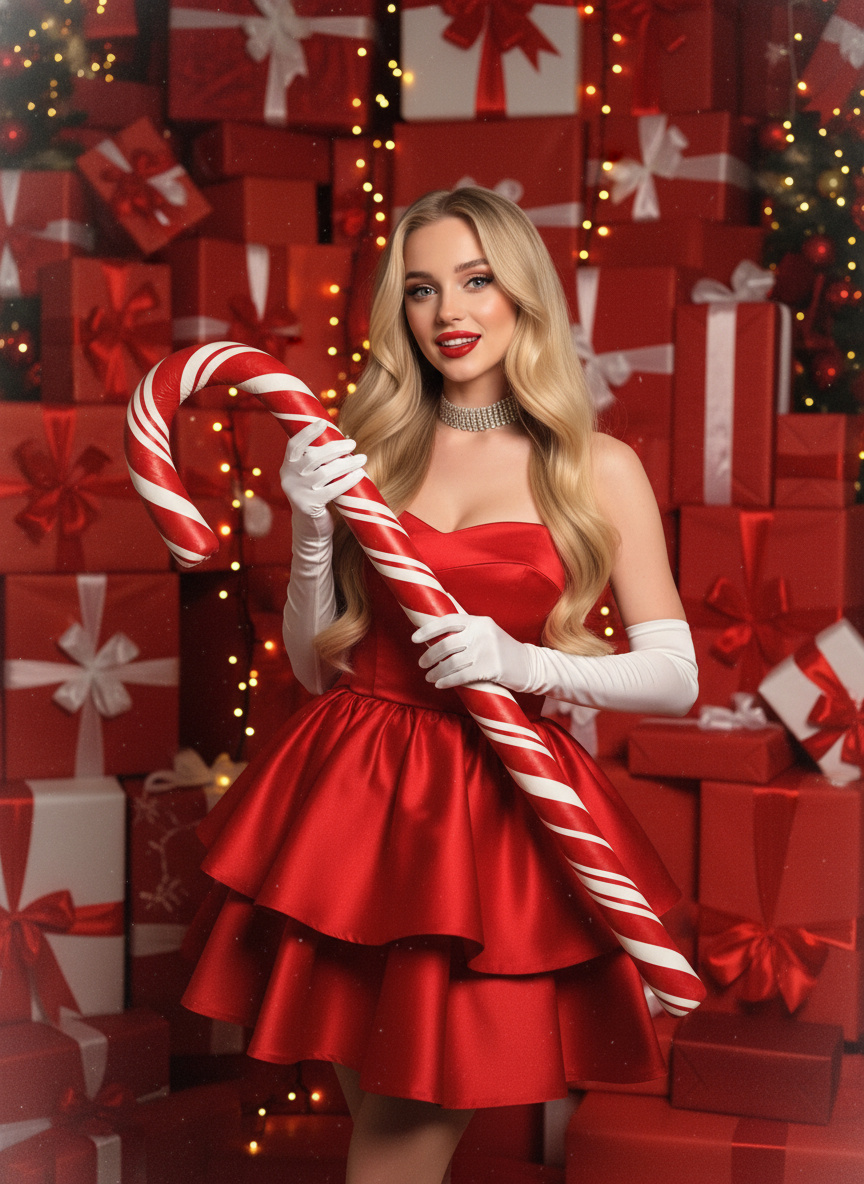
(Warm red film tone: 1.6), film shimmer, film texture (100% preservation of facial features in the reference photo: 1.6): This image portrays a woman with flowing hair, exuding an expression of pure delight, striking a cool and confident pose, complete with a chic and sultry demeanor. She gracefully embraces a giant, red-and-white striped candy cane, striking an elegant yet seductive stance. The backdrop is a vibrant red Christmas scene, adorned with towering stacks of gift boxes wrapped in rich red ribbons and bows, instantly evoking a lavish, festive ambiance. She wears a stunning red satin strapless layered skirt that shimmers delicately under the light, its intricate design adding a touch of glamorous sophistication. Her figure is subtly voluptuous yet undeniably sexy, highlighted by bright red lips and expertly crafted, three-dimensional eye makeup that accentuates her refined, high-fashion allure. Complementing her look are white long gloves, a dazzling rhinestone choker, and the same oversized red-and-white striped candy cane she holds. The lighting mimics warm-toned Christmas lights, perfectly enhancing the deep, luxurious texture of her red attire while beautifully capturing the intricate details of the ornate gift boxes—resulting in an overall visual masterpiece that’s both glamorous, alluring, and steeped in the spirit of the holiday season. A set of distinctly festive and unforgettable photographs.
Why Choose Guma.top for Your AI Visual Creations?
Guma.top makes professional AI image creation fast and effortless. With advanced rendering, natural identity preservation, polished visual quality, and a diverse creative ecosystem, anyone can create studio-quality graphics without a complicated editing workflow.
Natural Identity Retention
Your smile, face shape, skin tone, and subtle features remain recognizable, helping each generated portrait feel authentically yours.
One-Click Visual Quality
Skip complex photo-editing tools and get balanced lighting, crisp textures, and polished color grading in a single generation.
Fast and Reliable Processing
Quick, dependable generation keeps your creative workflow moving without long waits or complicated setup.
Diverse Style Ecosystem
Explore a broad collection of artistic styles, portrait enhancers, and creative generators in one convenient platform.
How to Create Your Christmas Candy Cane Portrait
Upload Your Selfie
Choose a clear, well-lit, front-facing photo so the engine can accurately capture your facial features.
Generate Your Scene
Click Generate to instantly merge your portrait into the rich Christmas candy cane setting.
Download Your Portrait
Save your full-resolution holiday portrait and share it on social media, add it to a greeting card, or keep it as a festive memory.
Unleash Your Imagination with Guma Creative AI Tools
Fuel your creativity and transform every visual concept into reality. Beyond festive portraits, Guma gives you an ever-expanding creative playground powered by versatile AI tools for generating, editing, and reimagining imagery. Explore the tools below to discover new artistic possibilities and streamline your creative workflow.
Explore More AI Portrait Tools and Visual Styles
Frequently Asked Questions About the AI Christmas Candy Cane Portrait Generator
What Makes a Great Input Photo for the Christmas Candy Cane Style?
A clear, front-facing portrait or selfie with good natural or room lighting works best. Avoid heavy motion blur, dark shadows across your face, or extreme side angles so the photo engine can read your facial structure clearly.
Will the Generated Image Look Like My Actual Face?
Yes. The technology is tuned to preserve your natural facial landmarks, skin tone, and distinctive features, helping the final Christmas picture look like an authentic portrait of you rather than a generic avatar.
Can I Use These Generated Pictures for Christmas Cards or Social Media?
Absolutely. The sharp, high-resolution results are suitable for Instagram posts, holiday greeting cards, seasonal profile pictures, or sharing with family and friends.
Do I Need to Type Custom Descriptions or Prompts to Get This Look?
No typing is required. The experience comes preconfigured with the complete studio setting, including the giant candy cane, red clothing, warm lights, and gift box background, so you can get a polished result with one click.
What Should I Do If My Hair or Accessory Details Look Slightly Altered?
For more accurate hair and accessory details, use a photo where your head and shoulders are fully visible and unobstructed. Avoid hats, dark sunglasses, or objects covering your hair or face.