
Template
AI Street Style Photo Generator
MoreUpload an image to start your template-based generation.
Upload Image
AI Street Style Photo Generator
Turn Your Photos into Night Street Style Shots
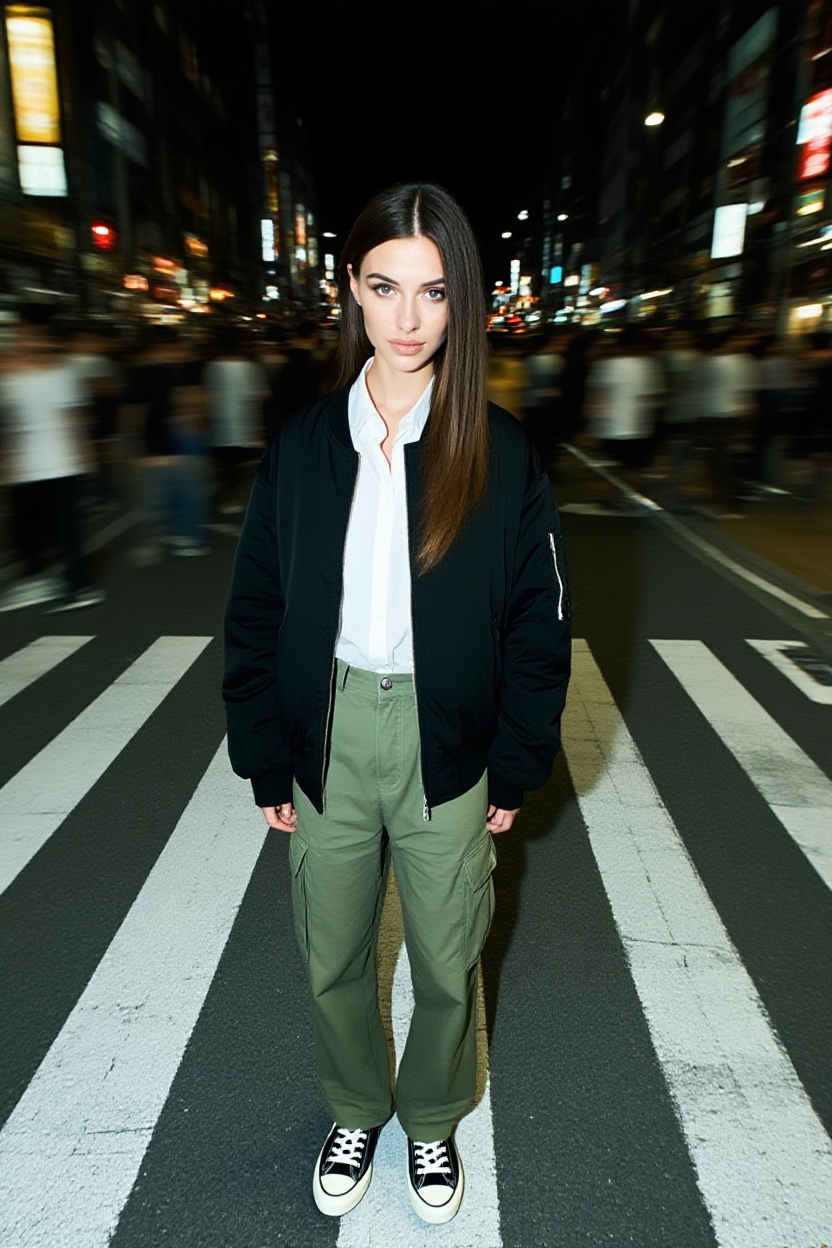
Freeze your moment while the city moves around you. Upload your portrait and instantly get that iconic neon crosswalk look with vibrant city lights, passing crowd motion, and your face and outfit staying fully sharp and clear.
AI Prompt
Cinematic street photography, captured mid-motion with a crowd-blur effect, overhead portrait style, evoking a moody urban aesthetic. The image features a film-like look, emphasizing timeless moments and emotional storytelling through its artistic photography approach. Styled as a streetwear fashion edit, the shot showcases me—standing calmly on a crosswalk in my White button-up shirt, paired with a black oversized jacket, loose olive-green cargo pants with side pockets, and classic black-and-white low-top sneakers. Meanwhile, the motion-blurred crowd rushes past her, set against dramatic city lighting that enhances the 35mm film-inspired aesthetic, with a shallow depth of field keeping her portrait sharply in focus—a perfect blend of artistry and timelessness in street photography.
Discover What Else You Can Create on Guma.top
This photo effect is just the start. Guma gives you an intuitive playground of smart AI image tools and creative features. Whether you want to generate fresh visual ideas from scratch or enhance your existing photo collection, our platform handles the complex image processing automatically so you can focus on building your next head turning creation.
How to Get Your Night Street Photo in Seconds
Upload Your Photo
Pick a clear photo of yourself with outfit shots and full body portraits working best.
Let Guma.top Render the Night Scene
Guma instantly places you on a busy night street surrounded by neon lights and passing crowds.
Save and Share
Preview your fresh urban portrait and hit download to get your high resolution image ready to post.
Why Creators and Fashion Lovers Choose Guma.top
Guma gives you editorial quality street photography without the hassle of expensive camera gear or complex editing tools. Our smart image engine automatically balances night lighting, isolates your portrait cleanly, and generates realistic background motion so you can publish stunning visuals instantly.
Crisp Edge Details for Hair and Outfits
Smart edge detection isolates fine hair strands, jacket folds, and sneaker shapes cleanly without any smudged borders or rough cutouts.
Realistic Night Lighting and Flash Balance
Low light photometry automatically adjusts shadows and neon highlights on your face and clothes to match the night city atmosphere.
Fast Cloud Processing
Powered by high performance GPU clusters, Guma turns your photo around in under 3 seconds so you never wait in long queues.
Encrypted and Private Image Handling
Your uploads are protected with TLS and AES 256 encryption. Photos are processed securely in temporary sessions and cleared automatically.
Explore Related Street Photo Effects and Styles
Frequently Asked Questions About AI Street Style Photo Generator
Will my face, hair, or clothes look blurry after applying the background motion effect?
No. Guma uses precise semantic segmentation to separate you from the background. The motion blur and crowd trails apply strictly to the street behind you, keeping your facial features, hair, and clothing at crisp optical sharpness.
What kind of photo gives the best result for this night crosswalk look?
Clear, well lit portraits or full body streetwear shots work best. Photos with visible outfit details and good lighting on your face will blend seamlessly into the neon street background.
Do I need to type in complex prompts or adjust camera settings manually?
Not at all. This tool works automatically. Just upload your portrait, and Guma instantly handles the background lighting, camera angle, and crowd motion for you.
How does Guma.top protect my uploaded photos and personal privacy?
We take privacy seriously. Your files are encrypted during upload and processed in secure temporary containers. Uploaded source photos are automatically deleted from our active servers as soon as your session ends.
Are the exported photos high enough resolution for Instagram and TikTok?
Yes. Images export in high definition 4K resolution with clear edge details, making them ideal for sharing on Instagram, TikTok, Pinterest, or personal portfolios.