
Template
AI Sweetheart Wallpaper Generator
MoreUpload an image to start your template-based generation.
Upload Image
AI Sweetheart Wallpaper Generator
Turn Your Photos into Sweet Home Portrait Wallpapers
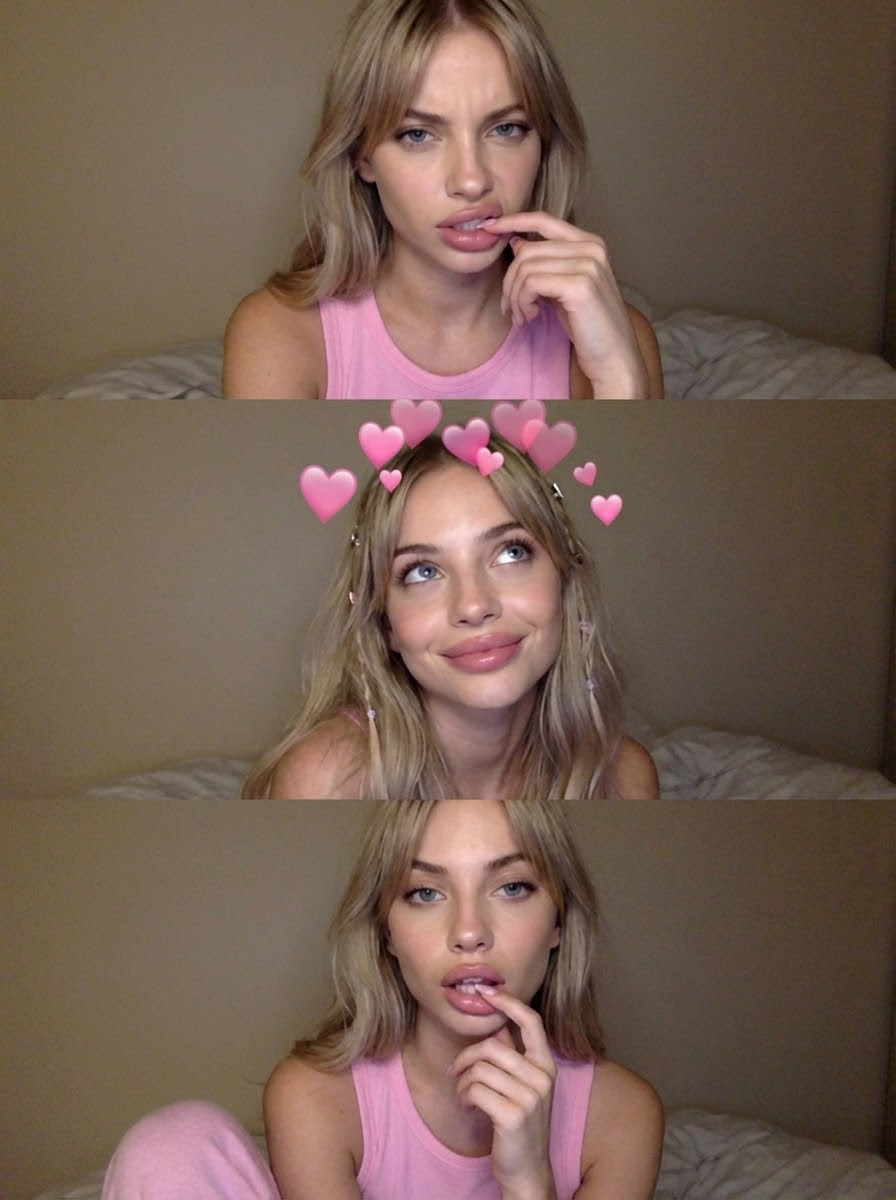
Create custom 3-frame portrait wallpapers in one tap. Guma seamlessly combines three stacked vertical shots—blending soft bedroom lighting, delicate heart filters, and candid facial expressions into a clean 9:16 phone background. Drop in your selfie and get a polished aesthetic photo grid instantly.
AI Prompt
In a dimly lit setting, this image is a collage of three low-resolution vertical photographs, styled (referencing the main facial features of the subject in the original image: 1.6). The theme is described as a sweet and refreshing home-style portrait. Keywords: The subject appears in three different poses in three frames—in the top frame, the subject lightly touches her lips with a slightly playful and annoyed expression; in the middle frame, the subject looks up, her hair loose, her eyes soft, and many pink gradient heart-shaped filters appear above her head, conveying a sweet feeling; in the bottom frame, the subject's lips are slightly parted, and a few fingers lightly touch her lips, showcasing a languid and sexy temperament. The expression is languid yet contains subtle emotions. She wears a pink vest, a simple and well-fitting loungewear set. The background is a beige wall and blurred sheets, a typical bedroom scene. The makeup features full lips and a sheer foundation, a sweet and refreshing mixed style. Her hair is adorned. This is a half-body portrait (showing shoulders and chest), composed of three photos stitched together. It fully showcases different subtle expressions and styling details, highlighting a relaxed and casual home atmosphere. (Main facial features and hair color are the same as the original image: 1.6), and the proportions are accurate.
Get your three-frame aesthetic collage in 3 easy steps
Drop in your favorite photo
Upload a clear front-facing picture into Guma to keep your exact facial features, hair color, and natural skin tone spot on.
Assemble your cozy home-style portrait
Let Guma layout three complementary vertical angles—mixing a playful lip touch, a soft glance, and cozy loungewear aesthetic into a unified trio grid.
Save your HD phone background
Preview your assembled multi-photo layout and export the high-res file directly to your camera roll, ready for your lock screen.
Explore More AI Aesthetic Styles and Generators
Frequently Asked Questions About Guma AI Wallpaper Generator
Will my face look natural across all three photo frames?
Yes. Guma locks in your core facial features and skin tone from your initial upload. The system maintains a consistent identity across the top, middle, and bottom panels while giving you natural variations in lighting, smiles, and head tilts.
Is the output sized properly for mobile screens?
The generator defaults to a standard 9:16 vertical aspect ratio, making it a perfect fit for mobile lock screens and home screen backgrounds without awkward cropping.
What kind of atmosphere does this generator create?
The setup focuses on a soft, relaxed bedroom vibe. It automatically incorporates beige backdrop tones, subtle linen textures, and delicate heart filter accents over the middle frame for that signature sweet aesthetic.
What type of photo gives the best output?
A clear portrait showing your face and shoulders under good lighting works best. While low-light selfies still work, daylight or clear indoor shots yield sharper details around hair strands and makeup textures.