
Raindance AI Video Generator
Upload a Photo and Join the Viral Raindance AI Dance Challenge in One Click
Simply upload one or two front-facing photos to transform static images into viral Raindance music and dance videos. Guma AI automatically extracts dance movement references and musical rhythms, enabling the people in your photos to lip-sync and move smoothly to the music. Even during zoomed-out shots and rapid frame transitions, facial details remain consistently locked and stable. Create high-quality dance videos without any manual editing.
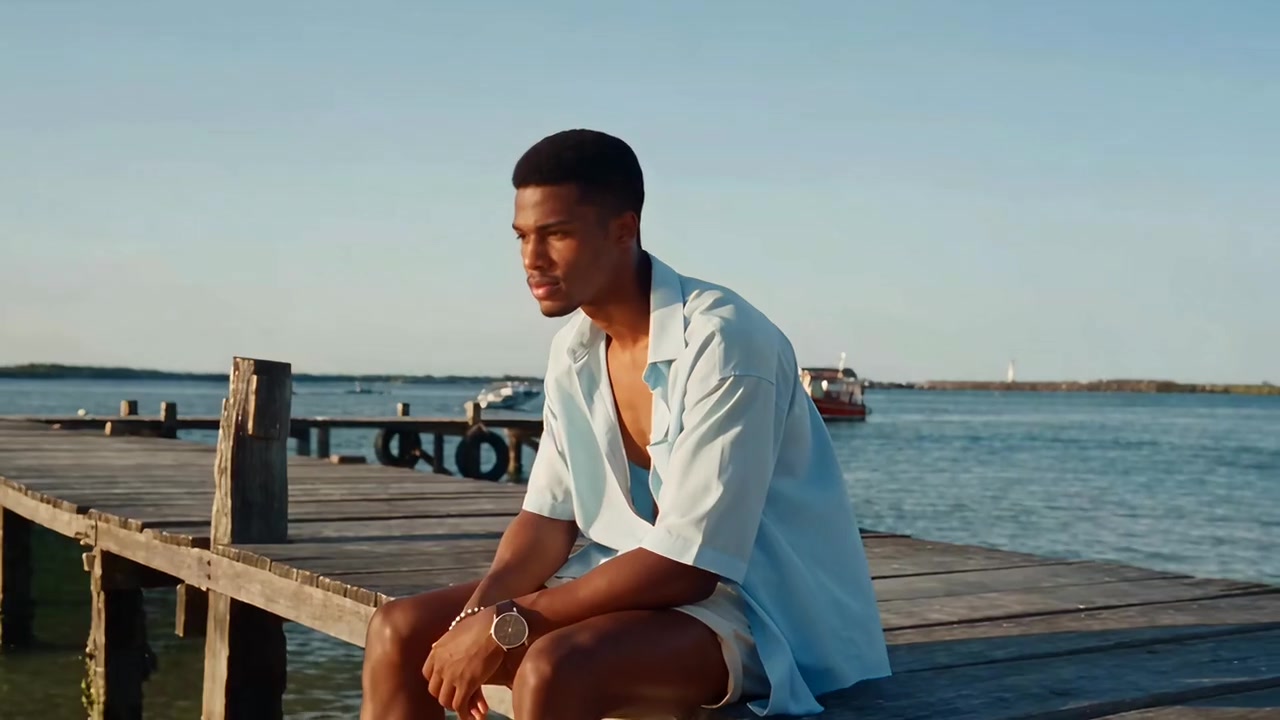
AI Prompt
"Generate a 28-second hyper-realistic video, in landscape composition and 4K resolution, with a seaside couple’s MV‑level authentic texture. {Camera shooting pixel parameters: 1.6}, natural film grain: 2.5, {realism parameter: 1.6}. The lighting transitions are smooth and natural, (each character’s facial features are 100% based on the uploaded reference images—Image 1 and Image 2 represent Character 1 and Character 2, respectively), and the human body proportions are perfectly accurate. Overall, this is a romantic short film set during the golden hour by the sea, narrated through seamless hard cuts and slow zooms, with no stuttering or frame drops throughout. **In all wide‑angle shots featuring Character 2, the face remains stable and clear, without flickering, distortion, or shifting facial features**, creating a gentle, soothing atmosphere brimming with the relaxed romance of a seaside date. [Video: 28 seconds] The setting is a sunny evening at the golden hour along the coast: a weathered gray‑brown wooden pier stretches out toward the sea, its wooden pilings adorned with black tire‑shaped bumpers; in the distance, a red‑and‑white fishing boat rests anchored, while a white lighthouse stands at the far end of the shoreline. The crystal‑clear blue‑green water shimmers with tiny ripples, and the beach below is a warm golden sand dotted with natural footprints. As sunset approaches, soft golden light gently illuminates the characters, lending the scene an ethereal, naturally blurred transparency characteristic of the seaside. At the opening, Character 1 sits alone on the pier, waiting. With Character 2’s entrance, the narrative gradually unfolds. All movements feel natural and fluid: - Character 1: Begins seated on the edge of the pier, hands resting casually on their knees as they gaze out to sea. Upon hearing footsteps, they turn to see Character 2 approaching. In the sandy beach scene, they pivot slightly to focus on Character 2 singing. On the pier, they kneel on one knee, holding a camera to capture Character 2 in the distance. During the sunset beach sequence, they sit side by side with Character 2, gazing at the ocean, their expression tender and attentive throughout. - Character 2: Slowly walks from the far end of the pier—a central figure driving the story forward. Standing on the pier, they face the camera and sing naturally, accompanied by relaxed gestures like adjusting their hair. On the beach, they perform a side‑facing vocal performance, pose gracefully for photos, and during the sunset segment, sit shoulder‑to‑shoulder with Character 1, their demeanor calm and gentle. Throughout wide‑angle and panoramic shots, their face remains crisp and steady. 0–4 seconds: A fixed medium shot looking straight ahead, fully showcasing the wooden pier and the surrounding seascape. Character 1 sits on the pier’s edge, gazing out to sea, then turns to look toward the far end of the pier. Meanwhile, Character 2 slowly walks toward the camera, maintaining a fixed position without movement, establishing the initial meeting between the two. 4–6 seconds: A hard cut to a close‑up of Character 2 from the chest up, against the backdrop of the clear blue‑green sea. Character 2 faces the camera, sings naturally, with hands clasped behind their back, their face sharp, steady, and free of flicker. 6–9 seconds: Another hard cut to a warm golden‑sand close‑up of the pair, sitting side by side on the fine sand. Character 2 sings while turning slightly to lift their chin, one hand lightly resting on their knee as they tap rhythmically. Character 1 turns their head to watch Character 2 intently, bathed in the warm golden glow of the setting sun. 9–18 seconds: Back to the pier, a medium shot of Character 2, standing on the pier and continuing to sing. Their arms rise naturally with the rhythm, making pointing and light tapping gestures, occasionally brushing their hair with a graceful motion. The camera slowly pulls back evenly, transitioning from a close‑up to a full view of the pier. Throughout this gradual pull‑back, Character 2’s face remains clear, stable, and flicker‑free, culminating in a wide‑angle shot showing Character 1 kneeling on the near end of the pier, holding a camera to photograph Character 2, who stands on the far end with one hand on her hip. 18–23 seconds: A hard cut to a medium shot of Character 1 kneeling on one knee, crouching on the wooden planks of the pier, raising their camera to capture Character 2 standing at the far end, posing naturally with one hand on her hip. The deep blue sea and pale blue sky serve as the backdrop, illuminated by soft, warm light. 23–24 seconds: A hard cut to a close‑up of Character 2’s face, arms crossed over their shoulders, their expression serene and gentle, against the dark blue sea. The light grows slightly dimmer as the sun sets, creating a quiet, tranquil mood. 24–28 seconds: A hard cut to a panoramic shot of the sunset beach, where warm orange‑pink hues blanket the sky, waves gently lap at the shore, and the couple sits side by side, gazing out to sea. The scene then shifts to a close‑up of the pair, with Character 2 lifting their chin to look into the distance, while Character 1 gently turns their head to watch them. The sequence concludes with the two sitting together, immersed in a relaxed, romantic moment, gazing peacefully at the ocean. [Key Highlights] Throughout the entire 28‑second video, transitions are smooth and natural, with no frame drops or sudden brightness spikes. The scenes shift organically with the narrative: the wooden pier, the blue‑green sea, the red‑and‑white fishing boat alongside the white lighthouse, the warm golden sand beach, and the pink‑orange sunset sky—all rendered under the soft, golden glow of the golden hour. In every wide‑angle and panoramic shot featuring Character 2, their face remains clear and stable, free of flicker, distortion, or shifting facial features. Only natural actions appropriate for a seaside date are permitted: gentle walking, spontaneous singing, rhythmic gestures, hair‑adjusting motions, taking photos with a camera, and sitting side by side to enjoy the view. No alterations to facial features or body proportions are allowed; significant shifts in character positioning, excessive camera shake, illogical scene transitions, jerky movements, limb deformities, finger distortions, additional unrelated characters, or any display of player controls, progress bars, or screenshot interfaces are strictly prohibited. All elements must preserve the tender, romantic essence of a golden‑hour seaside couple’s short film."
Create a Raindance AI Dance Video in Three Steps
Upload a Front-Facing Photo
Upload a clear, front-facing portrait as the facial and character reference for your video.
Select a Dance and Performance Mode
AI automatically matches classic Raindance moves with the rhythm of the background music.
Download and Export an HD Video
After submitting your task, wait a few moments to export a complete HD MP4 video optimized for short-form video aspect ratios.
Why Choose Guma AI to Create Raindance AI Videos?
Guma AI focuses on delivering highly accurate motion-driven animation and portrait video synthesis. By optimizing multi-shot rendering, it effectively resolves common issues found in traditional photo-to-video generation, including stiff movements, blurred faces in distant shots, and flickering lighting. You can easily take part in popular visual challenges without any professional dance or video-editing experience.
Clear and Stable Faces in Distant Shots
Facial features remain consistently locked during zoom-outs, camera movements, and shot transitions, preventing faces from changing or becoming distorted.
Precise Motion and Lip-Sync Timing
Built-in motion reference guidance and musical rhythm synchronization produce smooth, natural-looking videos without requiring manual frame-by-frame editing.
Supports Solo and Duet Modes
Create either a solo video featuring one person dancing in front of the camera or a duet video in which you interact and sing with a friend or idol.
Seamlessly Optimized for Popular Short-Video Aspect Ratios
Videos are exported in a vertical format by default, ready to be published directly on social platforms with clear image quality and natural motion.
Explore More AI Visual Generation Possibilities
In this creative space full of possibilities, you can turn text-based ideas directly into stunning visuals or bring a single static photo to life with realistic motion. Whether you want to reinvent your own artistic persona or transform the scenes in your imagination into HD videos, these tools provide stable, high-fidelity visual generation support, allowing every spark of inspiration to quickly become a captivating visual creation.


More Creative Tools to Explore
Frequently Asked Questions About the Raindance AI Video Generator
What Is the Raindance AI Video Generator?
The Raindance AI Video Generator is a viral dance video creation tool launched by the Guma AI platform. It transforms static front-facing photos into dance videos in which the subjects move and lip-sync to Raindance music while maintaining natural backgrounds and stable facial features throughout the entire video.
Can I Upload Just One Photo to Generate a Solo Dance Video?
Yes. The tool offers both Solo and Duet modes. If you upload only one photo, AI will set that person as the main character and automatically generate an individual video of them moving and singing along to the music.
Will the Face Change or Become Blurry in Distant Shots?
No. When processing zoomed-out shots, full-scene views, or shot transitions, the system continuously tracks the facial details in the original photo, effectively preventing flickering, distortion, or changes in appearance in distant shots.
Which Platforms Are Compatible with the Exported Video Format?
Generated videos use a vertical format optimized for mobile viewing and are exported as HD MP4 files. They can be uploaded directly to popular short-video platforms such as TikTok, Instagram Reels, and YouTube Shorts.
How Long Does Video Generation Take After Submission?
After uploading your photo and selecting a mode, video rendering is typically completed within 1 to 2 minutes. Once finished, you can preview and download the video directly online.