
Template
AI Magazine Cover Generator
MoreUpload an image to start your template-based generation.
Upload Image
AI Magazine Cover Generator
Turn Your Photo Into a Magazine Cover
Upload a clear portrait of one person, and AI will blend the subject with a magazine masthead, cover lines, and a complete editorial layout to give an everyday photo the look of a fashion magazine cover.
AI Prompt
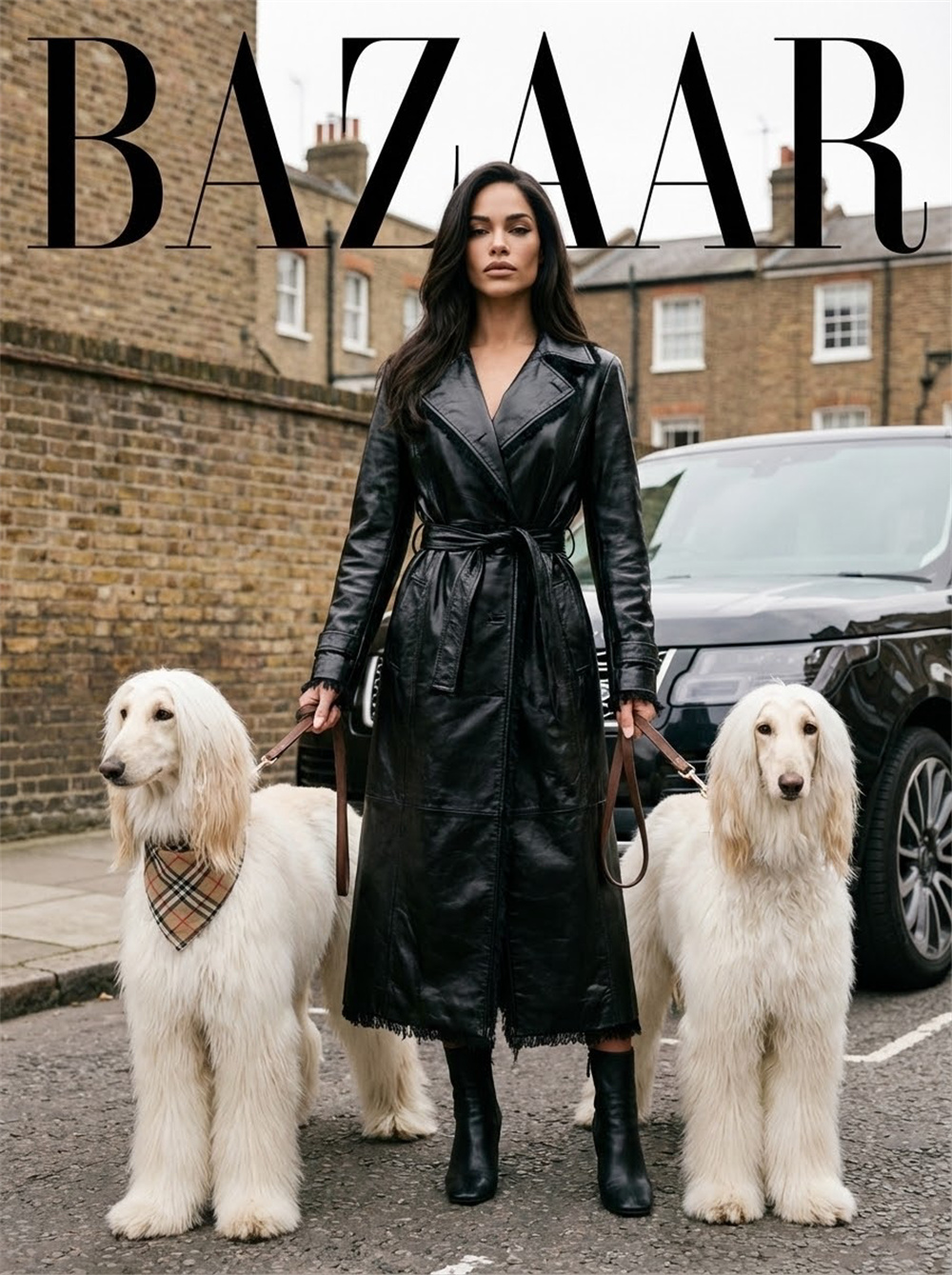
Background blurred (film tone: 1.6), (noise: 1.2), (referencing the main facial features of the person in the original image: 1.6) to generate the main character with a stylish hairstyle. (The protagonist and two long, white Afghan hounds) are presented in a cool and stylish standing pose, hands lightly holding the leashes, with the hounds on either side. The protagonist is tall, with a cool temperament and a calm and sophisticated expression, and the overall style matches that of a fashion magazine. She wears a long, black, shiny leather trench coat with a belt that cinches her waist (the leather adds a touch of smoothness, and the black frayed edges of the coat enhance its fashionable appeal, with natural wrinkles), paired with black ankle boots. The cinched waist design highlights her elegant temperament. Beside the protagonist is the front of a black luxury SUV, with a London cityscape in the background—retro brick walls and brick buildings, with a striking black BAZAAR magazine logo superimposed above, further enhancing the fashion magazine atmosphere. The makeup presents a cool and sophisticated style: matte nude lips, sculpted contours, and refined eye makeup (simple eyeshadow and sharp eyeliner), perfectly complementing the exquisite texture of the magazine photos. The accessory is a plaid triangular scarf worn by the hound (echoing a fashion element), simple yet detailed. The shoot uses full-body shots, fully showcasing the subject's posture, clothing material details, the hound's appearance, and the urban street scene background, highlighting the urban luxury style of the fashion magazine. (Main facial features and hair color are consistent with the original image: 1.6), and the proportions are accurate.
How to Turn a Photo Into a Magazine Cover in 3 Steps
Upload a Clear Portrait Photo
Choose a clear photo of one person with a visible face, natural lighting, and minimal obstruction. A simple composition helps keep the person at the center of the cover.
Generate Your Magazine Cover
Start the generation, and AI will combine the person with a magazine masthead, cover lines, and a coordinated layout. You do not need to choose a style or enter a written description.
Preview and Download Your Cover
Review the person, composition, and text placement. Once the overall result looks right, download the finished magazine cover to your device.
Why Use Guma for Your AI Magazine Cover
Guma helps everyday creators turn photos, text, and existing media into visual content directly in a browser, without installing professional editing software.
Start Right in Your Browser
Create online without installing additional software. It is a straightforward option for anyone who wants to explore a visual idea without setting up a complicated editing program.
Begin With Content You Already Have
Use a photo, a written idea, or an existing visual as your starting point. You can begin creating without having to face an empty canvas.
Explore Images and Videos in One Place
Image and video creation tools are available on the same site. After finishing an image, you can continue developing the same idea in other visual formats.
Follow a Clear Creative Process
Each tool guides you from adding your source material to reviewing the generated result, so even first time AI creators can understand what to do next.
Explore More Ways to Create With AI
A photo can be the beginning of a new creative idea. A sentence, an existing image, or a short piece of media can also lead to something new. Explore more ways to create images and videos based on what you want to make.



Explore More AI Portrait and Cover Effects
Frequently Asked Questions About the AI Magazine Cover Generator
What Is an AI Magazine Cover Generator?
An AI Magazine Cover Generator is an online tool that turns a portrait into a magazine cover image. The generated result typically includes a cover subject, magazine masthead, cover lines, and a complete editorial layout.
What Do I Need to Create a Magazine Cover?
You only need a clear photo of one person. For a stronger result, use a front facing or nearly front facing portrait and avoid photos where hair, hands, or other objects cover the face.
Do I Need to Write a Prompt?
No. The generator starts with the photo you upload, so you do not need to write an AI prompt or describe the image you want.
Can I Choose a Different Magazine Style?
The current page does not include style selection. After you upload a photo, the generator applies the visual treatment associated with this page.
Can I Edit the Magazine Masthead or Cover Lines?
The current creation process does not include text editing for the masthead or cover lines. The person, text, and layout are generated together as one complete magazine cover image.
What Does the Generated Magazine Cover Include?
The generated image includes the person from your uploaded photo, along with a magazine masthead, cover lines, and a coordinated cover layout. The composition and placement of the person may vary between photos.
Is This the Same as Generating an Image From Text?
No. This generator starts with an existing portrait rather than creating a new person from a written description.
What Kind of Photo Works Best for a Portrait Cover?
Use a single person portrait with a clear face, natural lighting, a visible subject, and a background that is not overly busy. Group photos, very small faces, and heavily obstructed portraits may affect how the person appears in the final cover.
Why Do Results Look Different With Different Photos?
The person’s angle, facial clarity, lighting, background, and original composition can all affect the final image. A photo with one clearly defined subject can help the cover portrait appear more prominent.
Do I Need to Install Any Software?
No. You can upload your photo, generate the cover, preview the result, and download the image directly in your browser.