
Knight Sword Swap
Turn Your Photo into a Heartwarming Knight Sword Swap Short Film
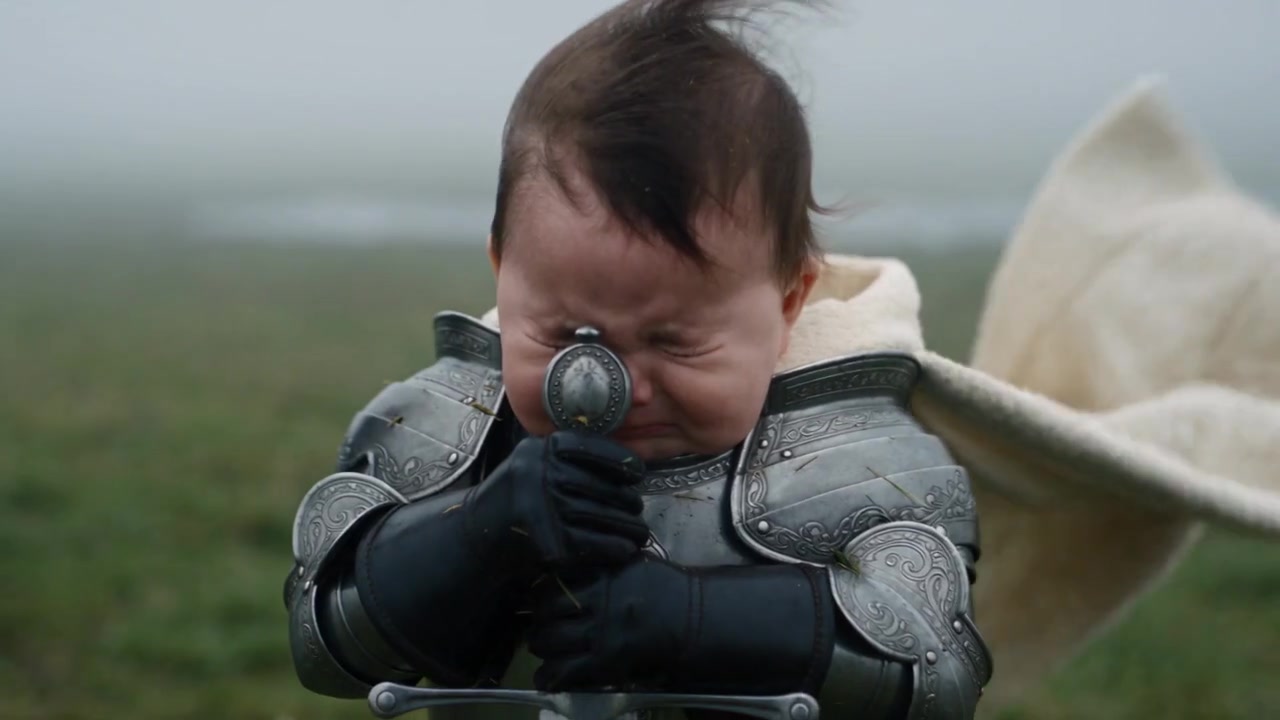
Simply upload one photo to transform your portrait into a 15-second heartwarming knight cinematic. The camera slowly pulls back across a misty meadow as a large knight drapes a black-and-gold cloak over you to shield you from the wind and rain, then gently takes away the long sword in your hand and replaces it with an adorable plush lion toy. Every facial expression and clothing detail is faithfully recreated, immersing you in a powerful sense of protection.
AI Prompt
Generate a 15-second hyper-realistic video with 4K HD cinematic texture, featuring {camera shooting pixel parameters: 1.6}, natural image noise level of 3.0, and {realism parameter: 1.6}. The lighting and shadow transitions are seamless, and the human body proportions are perfectly accurate. The protagonist’s facial features, gender, temperament, hair color, hairstyle, makeup, and outfit are all 100% based on the characteristics depicted in the provided @image. [Video: 15 seconds] This is an atmospheric narrative short film shot in a single continuous take, employing smooth, steady backtracking camera movements without any cuts. The story unfolds in an expansive, mist-shrouded meadow, where distant water surfaces vanish into thick fog. A constant breeze blows through, while the cool, hazy setting accentuates the cold, metallic sheen of the armor. The overall mood evolves gradually from initial helplessness and grievance to a tender, warm sense of being protected: 0–5 seconds: The scene opens with a low-angle close-up, focusing on a child standing amidst the grass. Dressed in a proportionally scaled-down, intricately carved silver suit of armor over a creamy white hooded top, the child’s white cape billows violently in the wind, while a tuft of hair stands upright atop their head. Their small hands, encased in black gloves, grip tightly onto the hilt of a long sword, holding it vertically before their face. Faint specks of grass and mud cling to the armor, giving the impression of a defeated, isolated little knight. The camera slowly pulls back at an extremely slow pace, revealing the adult knight’s armored leg on the left side of the frame. Soon after, a black cloak edged with gold unfurls from the right, spreading like an umbrella over the child’s head and shielding them from the gusting wind. 5–10 seconds: The camera continues its gradual pull-back to medium shot, fully introducing the adult knight. Clad in aged silver armor adorned with golden motifs and draped in a dark cloak, their wet, windswept hair disheveled as they kneel beside the child. In their metal-gloved hand, they hold a soft plush lion toy, gazing gently down at the child. With the wind blocked by the cloak, the child opens tearful eyes and looks up at the knight. Their furrowed little face slowly relaxes, curiosity shining through as they peer at the toy in the knight’s hands. The adult knight reaches out, gently placing their hand over the child’s tiny one clutching the sword, carefully taking the long blade away. With the other hand, they offer the plush lion to the child, who immediately releases the sword, wraps their arms around the soft toy, presses their face against its velvety fur, and the look of distress completely melts away. 10–15 seconds: The camera keeps pulling back until it captures a wide panoramic view. The adult knight rises slowly from their kneeling position, the sword they’ve taken now hanging naturally at their side. Their other hand, encased in a metal glove, rests lightly on the child’s head, offering gentle protection. The child, clutching the toy, stands beneath the shelter of the knight’s cloak, already wearing a joyful smile and leaning obediently against the knight’s leg. Finally, the shot settles on a sweeping panorama of the misty meadow: an empty expanse of grassland shrouded in wind and fog. The adult knight stands tall in the breeze, his black cloak partially wrapped around the little knight cradling the plush toy. Two figures—large and small, both clad in armor—stand firm within the cool mist. The wind still blows, but the child is safely enveloped, completing this tender tale of the knight’s protective care for the young one.
Create Your Knight Story in Just Three Simple Steps
Upload a Clear Portrait Photo
Choose a well-lit, front-facing portrait photo so that facial expressions and hairstyle features can be captured accurately.
Generate a Seamless Cinematic Video with One Click
The misty meadow at dawn, the slowly pulling-back camera angle, and the iconic scenes of the cloak shielding you from the wind and the long sword being taken away are automatically rendered for you.
Preview and Save Your HD Video
Once generation is complete, you can preview the video online. If you are satisfied with the result, save the HD video directly to your phone or computer and share it with your friends anytime.
Unlock Your Exclusive Tiny Knight Guardian Character
Everyone has a fairy-tale dream of being protected or protecting someone else. In this Tiny Knight Guardian visual experience, you can see yourself transformed into a tiny knight wearing intricately crafted silver armor. As the cinematic camera pulls back, the cold wind and rain are kept outside by an enormous cloak, while the heavy long sword in your hand is gently replaced with a plush toy, instantly turning loneliness and sadness into a powerful sense of safety and emotional comfort.
Why Creators Love Making Videos with Guma AI
Creating cinematic visuals here requires no complicated settings or knowledge of filming and post-production techniques. We handle all the complex processing behind the scenes, leaving you with only the most intuitive and seamless creative experience. Simply open the webpage and effortlessly create stunning visuals that immediately capture attention.
Faithful Facial and Clothing Details
As the camera slowly pulls back from a close-up to a wide shot, the generated character consistently matches your original facial features and clothing, so you do not have to worry about the person appearing distorted or unrealistic.
Fast and Seamless Video Generation
Say goodbye to heavy equipment and long waits. Complete the rendering directly on the webpage and receive your finished HD video within minutes.
Simple and Straightforward Page Design
The entire process is completely intuitive, taking you seamlessly from uploading your photo to receiving your video. There is no learning curve, and anyone can create a satisfying result on their first try.
On-Trend Dynamic Effects
Popular action shots and cinematic camera angles from across the internet are updated regularly, allowing you to be among the first to experience fresh and entertaining visual ideas.
Explore More Popular Visual Creation Styles and Effects
In addition to the medieval knight guardian story, a wide variety of visual creation experiences are available for you to explore. Whether you want to turn a static photo into a moving cinematic scene or experiment with entirely new visual styles and character transformations, you can easily bring today’s most popular visual inspirations to life.


Other Video Styles and Effects Everyone Is Trying
Frequently Asked Questions About the Knight Sword Swap AI Generator
What Kind of Story Does the Knight Sword Swap Effect Tell?
It is a heartwarming 15-second short film presented as one continuous shot. In a fog-covered meadow, a tiny knight stands alone holding a long sword. A large knight then uses a black cloak to protect the tiny knight from the wind and rain before replacing the sword in the tiny knight’s hand with an adorable plush lion toy.
What Kind of Photo Produces the Best Final Result?
We recommend choosing a clear, front-facing photo with natural lighting and no obstructions covering the facial features. Clearly visible facial contours and a defined hairline help the generated result reproduce your original appearance more accurately.
Can I Adjust the Camera Movement or Change the Story During Generation?
This effect uses carefully refined classic cinematic techniques. The camera movement speed, lighting changes, and interactive toy-swapping action have already been configured for you. Simply upload your photo and generate the video to receive a satisfying result.
How Long Does It Usually Take to Generate an HD Video?
Depending on the current generation queue, it usually takes one to two minutes. You can remain on the page while you wait and click the save button once the video preview has loaded.
What Special Character Details Are Included in Tiny Knight Guardian?
In this theme, the generated character wears a miniature suit of engraved silver armor over a white hoodie, with a playful tuft of hair on top and black gloves. These details create an adorable knight character full of charming contrast and heartwarming movements.
Does This Web Tool Have Any Computer Hardware or Smartphone Model Requirements?
There are no hardware requirements. All image generation and video rendering are completed in the cloud through the webpage. Whether you use an ordinary laptop or a mobile browser, you can enjoy a smooth experience.
Can I Share the Completed Video Directly on Douyin, Xiaohongshu, or WeChat Moments?
Absolutely. The downloaded video uses a standard HD format, so you can publish it on major social media platforms anytime and share your exclusive knight cinematic with your friends.
What Should I Do If the Person’s Face Is Not Clear Enough in the Generated Video?
We recommend trying again with a photo that has brighter lighting and shows the facial features facing the camera directly. This can significantly improve the accuracy of facial feature reproduction.