
Template
AI Snowy Forest Generator
MoreUpload an image to start your template-based generation.
Upload Image
AI Snowy Forest Generator
Step Into a Forest Covered in Snow
Upload a photo and let AI add snow covered trees, snowy ground, and a peaceful woodland setting to the scene. With Guma, there is no need to write a prompt or choose a visual style. Simply upload your image and start creating.
AI Prompt
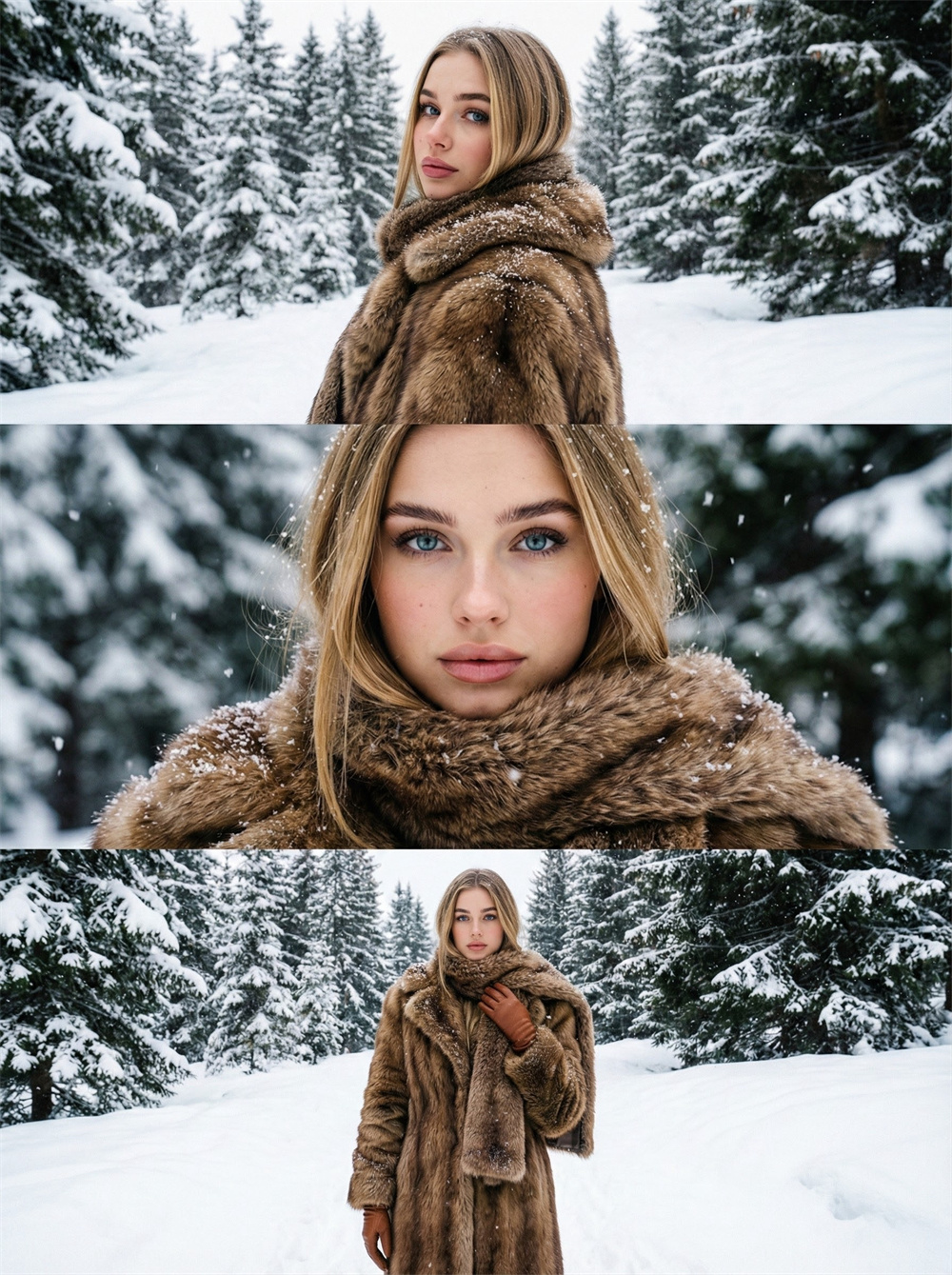
The main subject was generated using high-contrast colors, high saturation, low noise, film tone (1.5), and based on the main facial features of the original image (1.6). The image consists of three vertically collaged photos, filling the entire screen from top to bottom. A three-panel portrait with a retro feel in a snowy landscape: the protagonist is presented in different poses— the top panel shows him looking back sideways, the middle panel is a close-up of him looking directly at the camera, and the bottom panel shows him standing upright with his hand lightly draped over his scarf, his expression calm and aloof, perfectly matching the winter atmosphere; he wears a brown fur coat, a matching scarf, and brown leather gloves, the retro and heavy texture fitting the snowy scene; the background is a snow-covered winter pine forest, with snow covering the trees and clothing, the hazy snow enhancing the crisp winter atmosphere; there are no additional accessories—the focus of the look is the retro combination of the fur coat and leather gloves; the composition is mixed: the top panel is a medium shot (showing the shoulders, back, and environment), the middle panel is a close-up (focusing on the facial expression), and the bottom panel is a full-body shot (showing the complete look), the combination of multiple shot types highlighting the texture and atmosphere of the retro winter look. (Main facial features and hair color are the same as the original image: 1.6), the proportions are accurate.
Create a Snowy Forest Image in Three Steps
Upload a Clear Photo
Choose the image you want to transform from your device. Photos with a clear subject, complete composition, and uncluttered background generally work best.
Generate the Snowy Forest Scene
Start the generation process and let AI use the people, objects, and background in your photo to create a new scene with snowy trees, winter ground, and a forest setting.
Preview and Download Your Image
Review the completed snowy forest image. Once you are happy with the result, download it directly to your device.
Why Create With Guma?
Guma keeps examples, image guidance, and generation tools easy to find. You can see how an image may change before uploading your photo, without learning complicated photo editing techniques.
See the Intended Result First
Examples and clear descriptions show the main visual effect, helping you decide whether it fits your photo before you begin.
Follow a Simple Process
Uploading, generating, and reviewing your image follow a clear order. Even if this is your first time using an AI image tool, the next step is easy to find.
Create Without Complicated Settings
The experience stays focused on the result you want. There is no need to navigate multiple editing panels or learn professional image editing software.
Keep Exploring New Ideas
After completing one image, you can browse related creative tools and discover new ways to use the same photo.
Find a New Way to Bring Your Idea to Life
Sometimes you already have an image ready. Other times, you only have an idea of what you want to create. Explore different AI creation tools based on the content you have and the result you want to make.



Find Inspiration for Your Next Creation
AI Snowy Forest Generator FAQs
What Is an AI Snowy Forest Generator?
An AI Snowy Forest Generator turns an existing photo into a forest scene covered in snow. The generated image may include snowy trees, winter ground, a woodland setting, and a seasonal background.
How Do I Turn a Photo Into a Snowy Forest?
Upload the photo you want to transform and start the generation process. AI will use the subject and surroundings in the original image to create a snowy forest scene that you can preview when it is ready.
Do I Need to Write a Prompt?
No. You can begin after uploading your photo. There is no need to describe the trees, snow, or background in a text prompt.
Do I Need to Choose a Visual Style?
No. The creation process does not require you to select a style. AI applies the snowy forest effect directly to the uploaded image.
What Types of Photos Work Best?
Choose a photo with a clear subject, complete composition, and natural lighting. Images where the person or main object is easy to distinguish from the background generally produce a clearer result.
Can I Use a Photo That Does Not Already Have Snow?
Yes. The original photo does not need to include snow, winter ground, or a seasonal background. AI creates the snowy forest setting from the uploaded image.
Does the Original Photo Need to Include a Forest?
Not necessarily. Outdoor photos, natural backgrounds, and woodland scenes are especially well suited to this effect, but you can also try other images with a clear subject and complete background.
Can I Use a Portrait Photo?
You can try a portrait photo. For the best chance of a clear result, choose an image where the person is easy to see, the face is not heavily covered, and the background is clearly defined.
What Usually Appears in the Generated Image?
A snowy forest image may include trees covered in snow, snowy ground, a woodland background, and a consistent winter atmosphere. The exact result depends on the subject, camera angle, and surroundings in the original photo.
Why Does Each Photo Produce a Different Result?
Every photo has a different composition, lighting, subject position, and background. AI uses these details when generating the new forest scene, so the snow, trees, and surroundings may look different in each result.
What Should I Do if the Result Does Not Look Right?
Try another photo with a clearer subject, more complete composition, or simpler background. Heavy blur, extreme brightness, and large obstructions may make it harder to produce a clear image.
What Can I Use a Snowy Forest Image For?
Snowy forest images work well for profile pictures, social media posts, wallpapers, seasonal content, story illustrations, posters, and personal creative projects.