
Template
AI Couple Photo Generator
MoreUpload an image to start your template-based generation.
Upload Image
AI Couple Photo Generator
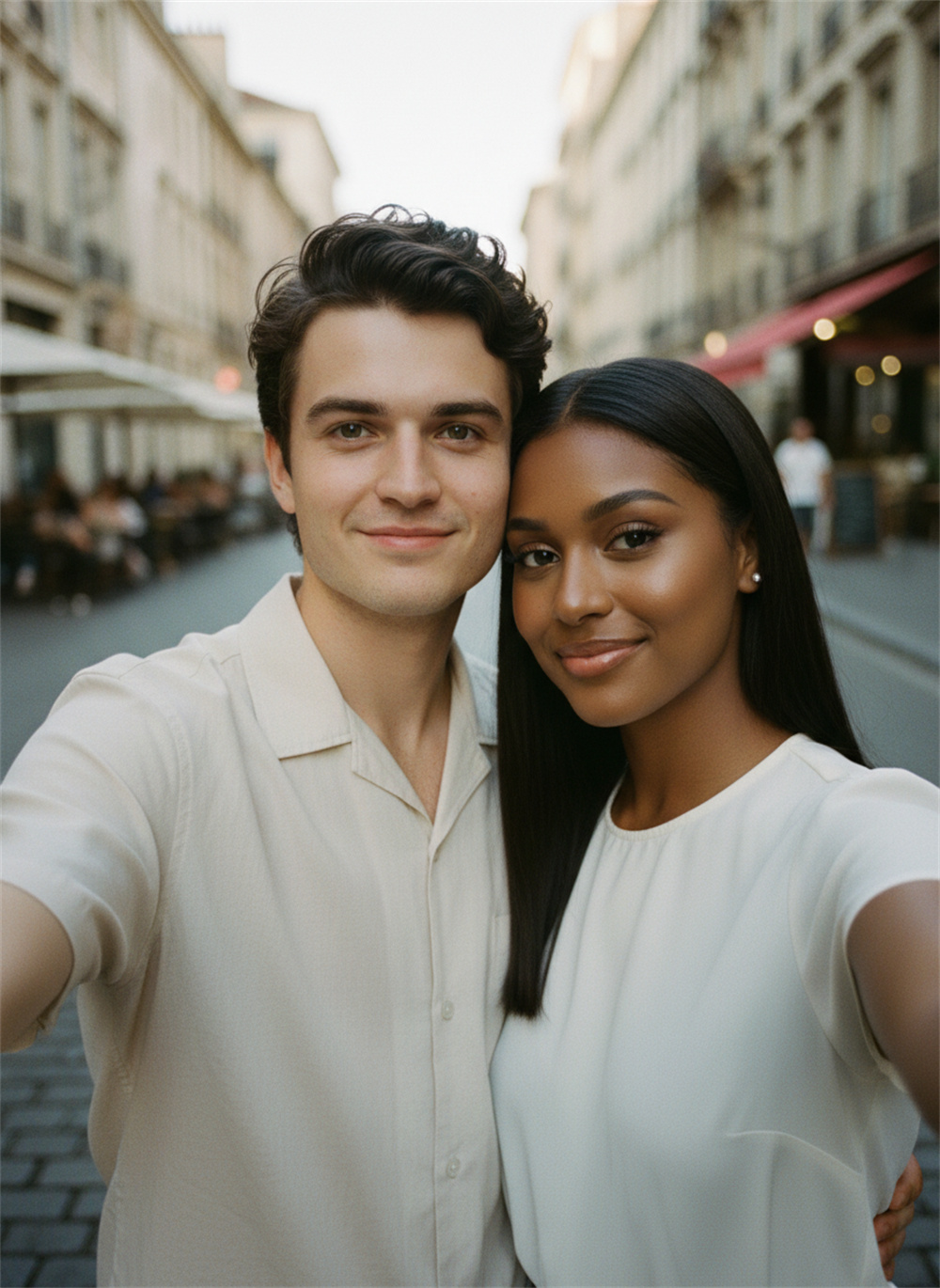
Bring Two Separate Photos Into One Shared Moment
Upload one clear photo of you and one of your partner. Guma will create an AI couple photo featuring both of you together. It is an easy way to make a shared picture when you are in a long distance relationship or simply have not taken the right photo together yet.
AI Prompt
The film-like colors and close-up upper-body shots (referencing the main facial features of the person in original image 1: 1.6) create a protagonist, and (referencing the main facial features of the person in original image 2: 1.6) create a protagonist looking directly at the camera. The protagonist is depicted in a pose of "head and shoulders closely together, both facing the camera in a selfie, with relaxed smiles," set against a European street backdrop featuring a blurred background and European architectural elements; no additional accessories are used, and simple clothing emphasizes a youthful and casual vibe. The shot employs a close-up from the head down to the shoulders and neck, showcasing summer attire. (The main facial features and hair color are identical to those in the original image: 1.6), and the proportions of the characters are accurately rendered.
Create Your AI Couple Photo in Three Steps
Upload One Clear Photo of Each Person
Add a clear solo photo of you and your partner. Choose images with one person in each photo, a clearly visible face, and natural lighting.
Generate Your Photo Together
Once both photos are uploaded, select the generate button. The AI couple photo generator will bring both people into one picture. No written prompt is required.
Preview and Download Your Couple Photo
Review the finished image and check how both people appear together. When the result looks right, download the couple photo to your device.
Why Create With Guma?
Guma organizes AI creation tools around what people want to make. Open the page that matches your idea, add the requested photo or text, and follow the guidance to create an image or video you can use.
Find the Right Creative Tool
Each tool is organized around a specific creative result, making it easier to move from an idea to the right creation page.
Know What to Add Before You Begin
Every creation page explains what type of content you need, so you can prepare a suitable photo or text before starting.
Follow a Clear Creation Flow
Simple instructions guide you from adding your content to viewing the finished result, even when you are trying an AI creative tool for the first time.
Keep Exploring New Ideas
After completing one creation, you can discover related tools and find new ways to work with the photos and ideas you already have.
Turn an Idea Into Something You Can Share
Some ideas begin with a sentence, while others start with a favorite photo. Choose a creative tool below, add your content, and turn that starting point into an image or video you can save, share, or develop further.



Discover More Ways to Create With AI
AI Couple Photo Generator FAQ
What Is an AI Couple Photo Generator?
An AI couple photo generator combines two separate portrait photos into one image that shows both people together. It can be used to create a shared selfie, romantic portrait, long distance couple picture, or personal keepsake.
How Do I Combine Two Photos Into a Couple Photo?
Upload one clear photo of each person and start the generation process. The tool analyzes both faces and creates a single couple picture featuring the two people together.
Can I Create a Couple Photo if We Have Never Taken a Picture Together?
Yes. The two photos can be taken separately and at different times. The generator uses the people shown in the uploaded images to create a new shared picture.
How Can Long Distance Couples Create a Photo Together?
Each person can provide a clear solo photo. Upload both images to create a long distance couple photo without needing to be in the same place when the original pictures are taken.
What Types of Photos Work Best?
Use clear solo portraits with one person in each image. Faces should be visible, well lit, and in focus. Photos with similar camera angles and image quality can help the final couple picture look more consistent.
Can I Use Photos Taken From Different Angles?
Photos taken from different angles can still work, but similar face positions usually create a more natural result. Front facing or slightly angled portraits are generally easier for the generator to combine.
Do I Need to Write a Prompt?
No. This AI couple picture generator uses a fixed creation flow. You only need to upload one photo of each person and start generating.
Can I Choose the Setting or Image Style?
No. The page uses a fixed visual direction, so there is no setting or style selection. The generated result is based on the two photos you upload and the design of the effect.
Why Does the Generated Face Look Slightly Different?
Face details can change when the source photo is blurry, heavily filtered, poorly lit, partly covered, or taken from an extreme angle. Clear portraits with visible facial features usually produce a more recognizable result.
What Should I Do if I Am Not Happy With the Result?
Try again with clearer photos that show both faces from similar angles. Avoid strong shadows, sunglasses, motion blur, cropped facial features, and images where another person appears in the background.
Is an AI Couple Photo a Real Photograph?
No. An AI couple photo is a newly generated image created from the uploaded photos. It can look like a shared picture, but it does not document a moment that happened in real life.
What Should I Consider Before Uploading My Partner’s Photo?
Use a photo your partner is comfortable sharing and avoid uploading sensitive or highly personal images. A clear everyday portrait is usually enough to create the couple photo.
What Can I Use an AI Couple Photo For?
You can use the result as a personal keepsake, anniversary picture, long distance relationship memory, profile image, or creative social post. It can also help you picture how two separate portraits might look as one shared photo.